K3s rmq
Quick Start Guide with K3s and LoxiLB in-cluster "service-proxy" mode
This document will explain how to install a K3s cluster with loxilb as a serviceLB provider running in-cluster "service-proxy" mode.
What is service-proxy mode?
service-proxy mode is where kubernetes cluster networking is entirely streamlined by loxilb for better performance.
 Looking at the left side of the image, you will notice the traffic flow of the packet as it enters the Kubernetes cluster. Kube-proxy, the de-facto networking agent in the Kubernetes which runs on each node of the cluster which monitors the services and translates them to either iptables or IPVS tangible rules. If we talk about the functionality or a cluster with low volume traffic then kube-proxy is fine but when it comes to scalability or a high volume traffic then it acts as a bottle-neck.
loxilb "service-proxy" mode works with Flannel and kube-proxy in IPVS mode. It simplifies all the IPVS rules and injects them in it's in-kernel eBPF data-path. Traffic will reach at the interface, will be processed by eBPF and sent directly to the pod or to the other node, bypassing all the layers of Linux networking. This way, all the services, be it External, NodePort or ClusterIP, can be managed through LoxiLB.
Looking at the left side of the image, you will notice the traffic flow of the packet as it enters the Kubernetes cluster. Kube-proxy, the de-facto networking agent in the Kubernetes which runs on each node of the cluster which monitors the services and translates them to either iptables or IPVS tangible rules. If we talk about the functionality or a cluster with low volume traffic then kube-proxy is fine but when it comes to scalability or a high volume traffic then it acts as a bottle-neck.
loxilb "service-proxy" mode works with Flannel and kube-proxy in IPVS mode. It simplifies all the IPVS rules and injects them in it's in-kernel eBPF data-path. Traffic will reach at the interface, will be processed by eBPF and sent directly to the pod or to the other node, bypassing all the layers of Linux networking. This way, all the services, be it External, NodePort or ClusterIP, can be managed through LoxiLB.
Topology
For quickly bringing up loxilb in-cluster and K3s, we will be deploying a 4 nodes k3s cluster :
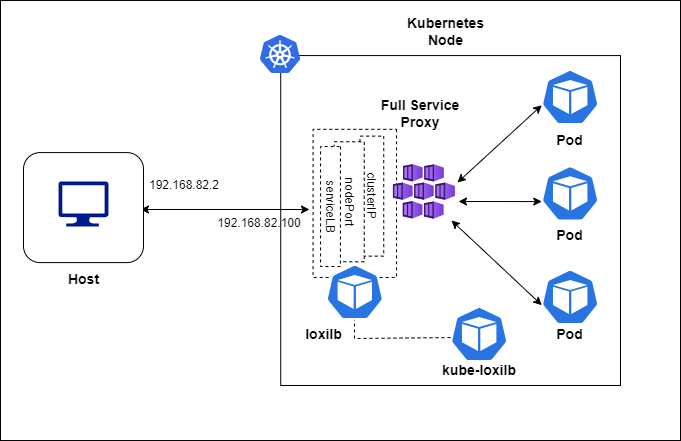
loxilb and kube-loxilb components run as pods managed by kubernetes in this scenario.
Setup K3s
Configure Master node
$ curl -sfL https://get.k3s.io | INSTALL_K3S_EXEC="--disable traefik \
--disable servicelb \
--disable-cloud-controller \
--kube-proxy-arg proxy-mode=ipvs \
--flannel-iface=eth1 \
--disable-network-policy \
--node-ip=${MASTER_IP} \
--node-external-ip=${MASTER_IP} \
--bind-address=${MASTER_IP}" sh -
Configure Worker nodes
$ curl -sfL https://get.k3s.io | K3S_URL="https://${MASTER_IP}:6443"\
 K3S_TOKEN="${NODE_TOKEN}" \
 INSTALL_K3S_EXEC="--node-ip=${WORKER_ADDR} \
--node-external-ip=${WORKER_IP} \
--kube-proxy-arg proxy-mode=ipvs \
--flannel-iface=eth1" sh -
How to deploy kube-loxilb ?
kube-loxilb is used as an operator to manage loxilb.
wget https://raw.githubusercontent.com/loxilb-io/kube-loxilb/main/manifest/mesh/kube-loxilb.yml
kube-loxilb.yaml
       args:
         #- --loxiURL=http://172.17.0.2:11111
         - --externalCIDR=192.168.82.100/32
         - --setRoles=0.0.0.0
         #- --monitor
         #- --setBGP
Apply after making changes (if any) :
sudo kubectl apply -f kube-loxilb.yaml
How to deploy loxilb ?
loxilb can be deloyed by using the following command in the K3s node
sudo kubectl apply -f https://raw.githubusercontent.com/loxilb-io/kube-loxilb/main/manifest/mesh/loxilb-mesh.yml
Seup RabbitMQ Operator
sudo kubectl apply -f "https://github.com/rabbitmq/cluster-operator/releases/latest/download/cluster-operator.yml"
Setup RabbitMQ application with loxilb
wget https://raw.githubusercontent.com/rabbitmq/cluster-operator/main/docs/examples/hello-world/rabbitmq.yaml
apiVersion: rabbitmq.com/v1beta1
kind: RabbitmqCluster
metadata:
  name: hello-world
spec:
  replicas: 3
  service:
    type: LoadBalancer
  override:
    service:
      spec:
        loadBalancerClass: loxilb.io/loxilb
        externalTrafficPolicy: Local
        ports:
        - port: 5672
Create the service
sudo kubectl apply -f rabbitmq.yaml
Check the status
In k3s node:
## Check the pods created
$ sudo kubectl get pods -A
NAMESPACE         NAME                                        READY   STATUS    RESTARTS   AGE
kube-system       local-path-provisioner-6c86858495-65tbc     1/1     Running   0          137m
kube-system       coredns-6799fbcd5-5h2dw                     1/1     Running   0          137m
kube-system       metrics-server-67c658944b-mtv9q             1/1     Running   0          137m
rabbitmq-system   rabbitmq-cluster-operator-ccf488f4c-sphfm   1/1     Running   0          8m12s
kube-system       kube-loxilb-5fb5566999-4dj2v                1/1     Running   0          4m18s
kube-system       loxilb-lb-txtfm                             1/1     Running   0          3m57s
kube-system       loxilb-lb-fnv97                             1/1     Running   0          3m57s
kube-system       loxilb-lb-r7mks                             1/1     Running   0          3m57s
kube-system       loxilb-lb-xxn29                             1/1     Running   0          3m57s
default           hello-world-server-0                        1/1     Running   0          72s
default           hello-world-server-1                        1/1     Running   0          72s
default           hello-world-server-2                        1/1     Running   0          72s


## Check the services created
$ sudo kubectl get svc
sudo kubectl get svc
NAME                TYPE           CLUSTER-IP      EXTERNAL-IP         PORT(S)                                           AGE
kubernetes          ClusterIP      10.43.0.1       <none>              443/TCP                                           136m
hello-world-nodes   ClusterIP      None            <none>              4369/TCP,25672/TCP                                7s
hello-world         LoadBalancer   10.43.190.199   llb-192.168.82.100   15692:31224/TCP,5672:30817/TCP,15672:30698/TCP   7s
$ sudo kubectl exec -it -n kube-system loxilb-lb-8l85d -- loxicmd get lb -o wide
sudo kubectl exec -it loxilb-lb-txtfm -n kube-system -- loxicmd get lb -o wide
| EXT IP | SEC IPS | PORT | PROTO | NAME | MARK | SEL | MODE | ENDPOINT | EPORT | WEIGHT | STATE | COUNTERS |
|---------------|---------|-------|-------|------------------------------|------|-----|---------|----------------|-------|--------|--------|----------|
| 10.0.2.15 | | 30698 | tcp | ipvs_10.0.2.15:30698-tcp | 0 | rr | fullnat | 10.42.1.6 | 15672 | 1 | active | 0:0 |
| | | | | | | | | 10.42.2.6 | 15672 | 1 | active | 0:0 |
| | | | | | | | | 10.42.3.7 | 15672 | 1 | active | 0:0 |
| 10.0.2.15 | | 30817 | tcp | ipvs_10.0.2.15:30817-tcp | 0 | rr | fullnat | 10.42.1.6 | 5672 | 1 | active | 0:0 |
| | | | | | | | | 10.42.2.6 | 5672 | 1 | active | 0:0 |
| | | | | | | | | 10.42.3.7 | 5672 | 1 | active | 0:0 |
| 10.0.2.15 | | 31224 | tcp | ipvs_10.0.2.15:31224-tcp | 0 | rr | fullnat | 10.42.1.6 | 15692 | 1 | active | 0:0 |
| | | | | | | | | 10.42.2.6 | 15692 | 1 | active | 0:0 |
| | | | | | | | | 10.42.3.7 | 15692 | 1 | active | 0:0 |
| 10.42.0.0 | | 30698 | tcp | ipvs_10.42.0.0:30698-tcp | 0 | rr | fullnat | 10.42.1.6 | 15672 | 1 | active | 0:0 |
| | | | | | | | | 10.42.2.6 | 15672 | 1 | active | 0:0 |
| | | | | | | | | 10.42.3.7 | 15672 | 1 | active | 0:0 |
| 10.42.0.0 | | 30817 | tcp | ipvs_10.42.0.0:30817-tcp | 0 | rr | fullnat | 10.42.1.6 | 5672 | 1 | active | 0:0 |
| | | | | | | | | 10.42.2.6 | 5672 | 1 | active | 0:0 |
| | | | | | | | | 10.42.3.7 | 5672 | 1 | active | 0:0 |
| 10.42.0.0 | | 31224 | tcp | ipvs_10.42.0.0:31224-tcp | 0 | rr | fullnat | 10.42.1.6 | 15692 | 1 | active | 0:0 |
| | | | | | | | | 10.42.2.6 | 15692 | 1 | active | 0:0 |
| | | | | | | | | 10.42.3.7 | 15692 | 1 | active | 0:0 |
| 10.42.0.1 | | 30698 | tcp | ipvs_10.42.0.1:30698-tcp | 0 | rr | fullnat | 10.42.1.6 | 15672 | 1 | active | 0:0 |
| | | | | | | | | 10.42.2.6 | 15672 | 1 | active | 0:0 |
| | | | | | | | | 10.42.3.7 | 15672 | 1 | active | 0:0 |
| 10.42.0.1 | | 30817 | tcp | ipvs_10.42.0.1:30817-tcp | 0 | rr | fullnat | 10.42.1.6 | 5672 | 1 | active | 0:0 |
| | | | | | | | | 10.42.2.6 | 5672 | 1 | active | 0:0 |
| | | | | | | | | 10.42.3.7 | 5672 | 1 | active | 0:0 |
| 10.42.0.1 | | 31224 | tcp | ipvs_10.42.0.1:31224-tcp | 0 | rr | fullnat | 10.42.1.6 | 15692 | 1 | active | 0:0 |
| | | | | | | | | 10.42.2.6 | 15692 | 1 | active | 0:0 |
| | | | | | | | | 10.42.3.7 | 15692 | 1 | active | 0:0 |
| 10.43.0.10 | | 53 | tcp | ipvs_10.43.0.10:53-tcp | 0 | rr | default | 10.42.0.3 | 53 | 1 | - | 0:0 |
| 10.43.0.10 | | 53 | udp | ipvs_10.43.0.10:53-udp | 0 | rr | default | 10.42.0.3 | 53 | 1 | - | 0:0 |
| 10.43.0.10 | | 9153 | tcp | ipvs_10.43.0.10:9153-tcp | 0 | rr | default | 10.42.0.3 | 9153 | 1 | - | 0:0 |
| 10.43.0.1 | | 443 | tcp | ipvs_10.43.0.1:443-tcp | 0 | rr | default | 192.168.80.10 | 6443 | 1 | - | 0:0 |
| 10.43.190.199 | | 5672 | tcp | ipvs_10.43.190.199:5672-tcp | 0 | rr | default | 10.42.1.6 | 5672 | 1 | - | 0:0 |
| | | | | | | | | 10.42.2.6 | 5672 | 1 | - | 0:0 |
| | | | | | | | | 10.42.3.7 | 5672 | 1 | - | 0:0 |
| 10.43.190.199 | | 15672 | tcp | ipvs_10.43.190.199:15672-tcp | 0 | rr | default | 10.42.1.6 | 15672 | 1 | - | 0:0 |
| | | | | | | | | 10.42.2.6 | 15672 | 1 | - | 0:0 |
| | | | | | | | | 10.42.3.7 | 15672 | 1 | - | 0:0 |
| 10.43.190.199 | | 15692 | tcp | ipvs_10.43.190.199:15692-tcp | 0 | rr | default | 10.42.1.6 | 15692 | 1 | - | 0:0 |
| | | | | | | | | 10.42.2.6 | 15692 | 1 | - | 0:0 |
| | | | | | | | | 10.42.3.7 | 15692 | 1 | - | 0:0 |
| 10.43.5.58 | | 443 | tcp | ipvs_10.43.5.58:443-tcp | 0 | rr | default | 10.42.0.4 | 10250 | 1 | - | 0:0 |
| 192.168.80.10 | | 30698 | tcp | ipvs_192.168.80.10:30698-tcp | 0 | rr | fullnat | 10.42.1.6 | 15672 | 1 | active | 0:0 |
| | | | | | | | | 10.42.2.6 | 15672 | 1 | active | 0:0 |
| | | | | | | | | 10.42.3.7 | 15672 | 1 | active | 0:0 |
| 192.168.80.10 | | 30817 | tcp | ipvs_192.168.80.10:30817-tcp | 0 | rr | fullnat | 10.42.1.6 | 5672 | 1 | active | 0:0 |
| | | | | | | | | 10.42.2.6 | 5672 | 1 | active | 0:0 |
| | | | | | | | | 10.42.3.7 | 5672 | 1 | active | 0:0 |
| 192.168.80.10 | | 31224 | tcp | ipvs_192.168.80.10:31224-tcp | 0 | rr | fullnat | 10.42.1.6 | 15692 | 1 | active | 0:0 |
| | | | | | | | | 10.42.2.6 | 15692 | 1 | active | 0:0 |
| | | | | | | | | 10.42.3.7 | 15692 | 1 | active | 0:0 |
| 192.168.80.20 | | 5672 | tcp | default_hello-world | 0 | rr | onearm | 192.168.80.101 | 30817 | 1 | - | 0:0 |
| | | | | | | | | 192.168.80.102 | 30817 | 1 | - | 0:0 |
| | | | | | | | | 192.168.80.103 | 30817 | 1 | - | 0:0 |
| 192.168.80.20 | | 15672 | tcp | default_hello-world | 0 | rr | onearm | 192.168.80.101 | 30698 | 1 | - | 0:0 |
| | | | | | | | | 192.168.80.102 | 30698 | 1 | - | 0:0 |
| | | | | | | | | 192.168.80.103 | 30698 | 1 | - | 0:0 |
| 192.168.80.20 | | 15692 | tcp | default_hello-world | 0 | rr | onearm | 192.168.80.101 | 31224 | 1 | - | 0:0 |
| | | | | | | | | 192.168.80.102 | 31224 | 1 | - | 0:0 |
| | | | | | | | | 192.168.80.103 | 31224 | 1 | - | 0:0 |
| 192.168.80.20 | | 30698 | tcp | ipvs_192.168.80.20:30698-tcp | 0 | rr | fullnat | 10.42.1.6 | 15672 | 1 | active | 0:0 |
| | | | | | | | | 10.42.2.6 | 15672 | 1 | active | 0:0 |
| | | | | | | | | 10.42.3.7 | 15672 | 1 | active | 0:0 |
| 192.168.80.20 | | 30817 | tcp | ipvs_192.168.80.20:30817-tcp | 0 | rr | fullnat | 10.42.1.6 | 5672 | 1 | active | 0:0 |
| | | | | | | | | 10.42.2.6 | 5672 | 1 | active | 0:0 |
| | | | | | | | | 10.42.3.7 | 5672 | 1 | active | 0:0 |
| 192.168.80.20 | | 31224 | tcp | ipvs_192.168.80.20:31224-tcp | 0 | rr | fullnat | 10.42.1.6 | 15692 | 1 | active | 0:0 |
| | | | | | | | | 10.42.2.6 | 15692 | 1 | active | 0:0 |
| | | | | | | | | 10.42.3.7 | 15692 | 1 | active | 0:0 |
Get RabbitMQ Credentials
username="$(sudo kubectl get secret hello-world-default-user -o jsonpath='{.data.username}' | base64 --decode)"
password="$(sudo kubectl get secret hello-world-default-user -o jsonpath='{.data.password}' | base64 --decode)"
Test RabbitMQ from host/client
sudo docker run -it --rm --net=host pivotalrabbitmq/perf-test:latest --uri amqp://$username:$password@192.168.80.20:5672 -x 10 -y 10 -u "throughput-test-4" -a --id "test 4" -z100